

01 / 06Every policy, resolved
Point it at a cluster.
Kubesonar reads policies, pods and services through a read-only role. Nothing is installed in the cluster.
Kubesonar reads policies, pods and services through a read-only role. Nothing is installed in the cluster.
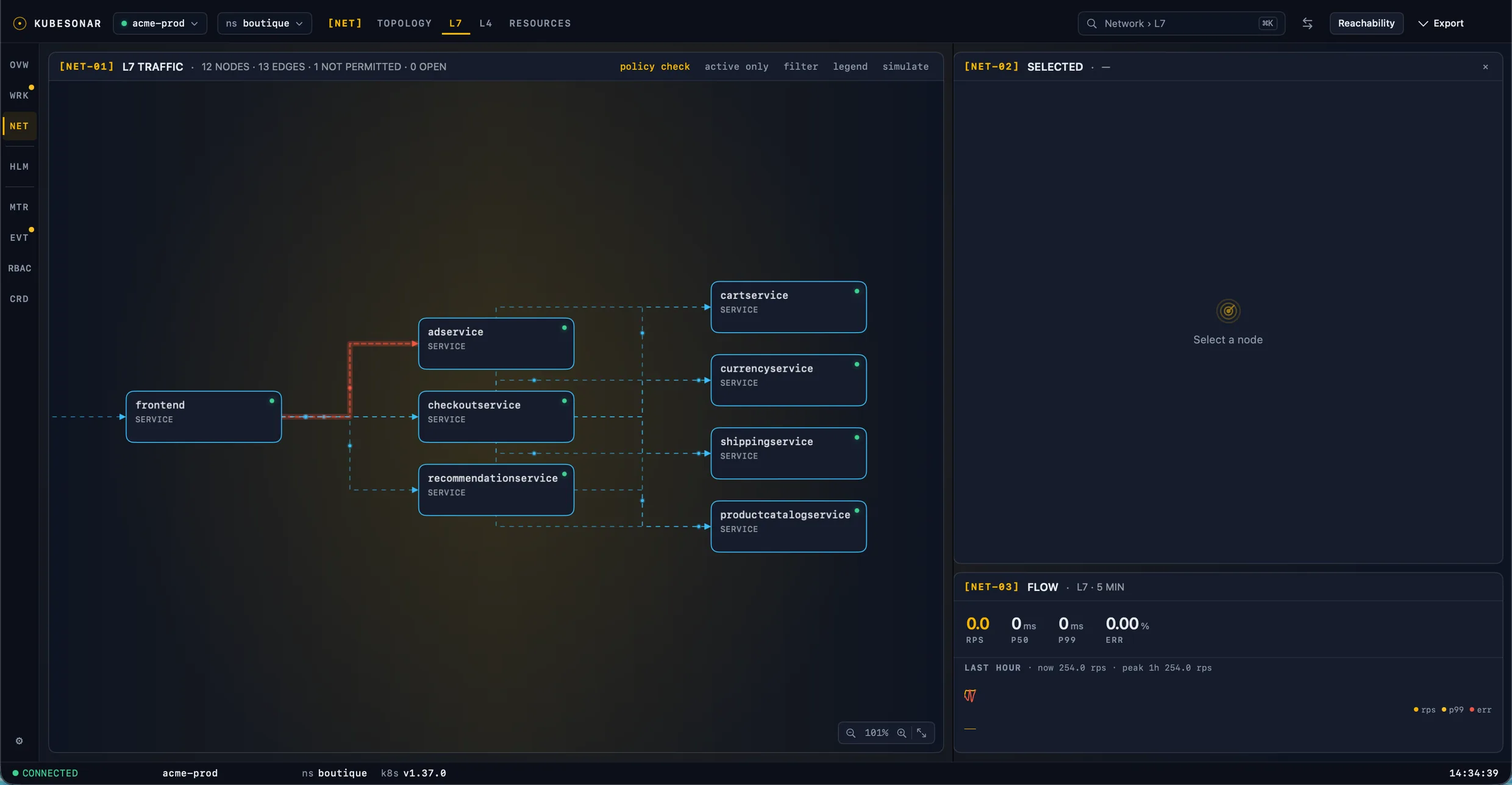
Real connections between workloads, drawn on the topology as they happen.
No error, no event. Somewhere, a policy said no.
Against the live labels, namespaces and ports in the cluster, the way your CNI enforces them.
Each connection gets a verdict and the one rule that decided it, with the reason in a sentence.
Kubesonar resolves every NetworkPolicy in your cluster, observes the traffic that actually flows, and names the policy, the rule and the port that decide each connection. Native macOS, works with a read-only role, nothing installed in the cluster.
Free 14-day trialNo accountmacOS 15 or later, Apple siliconLatest release v1.0 · changelog
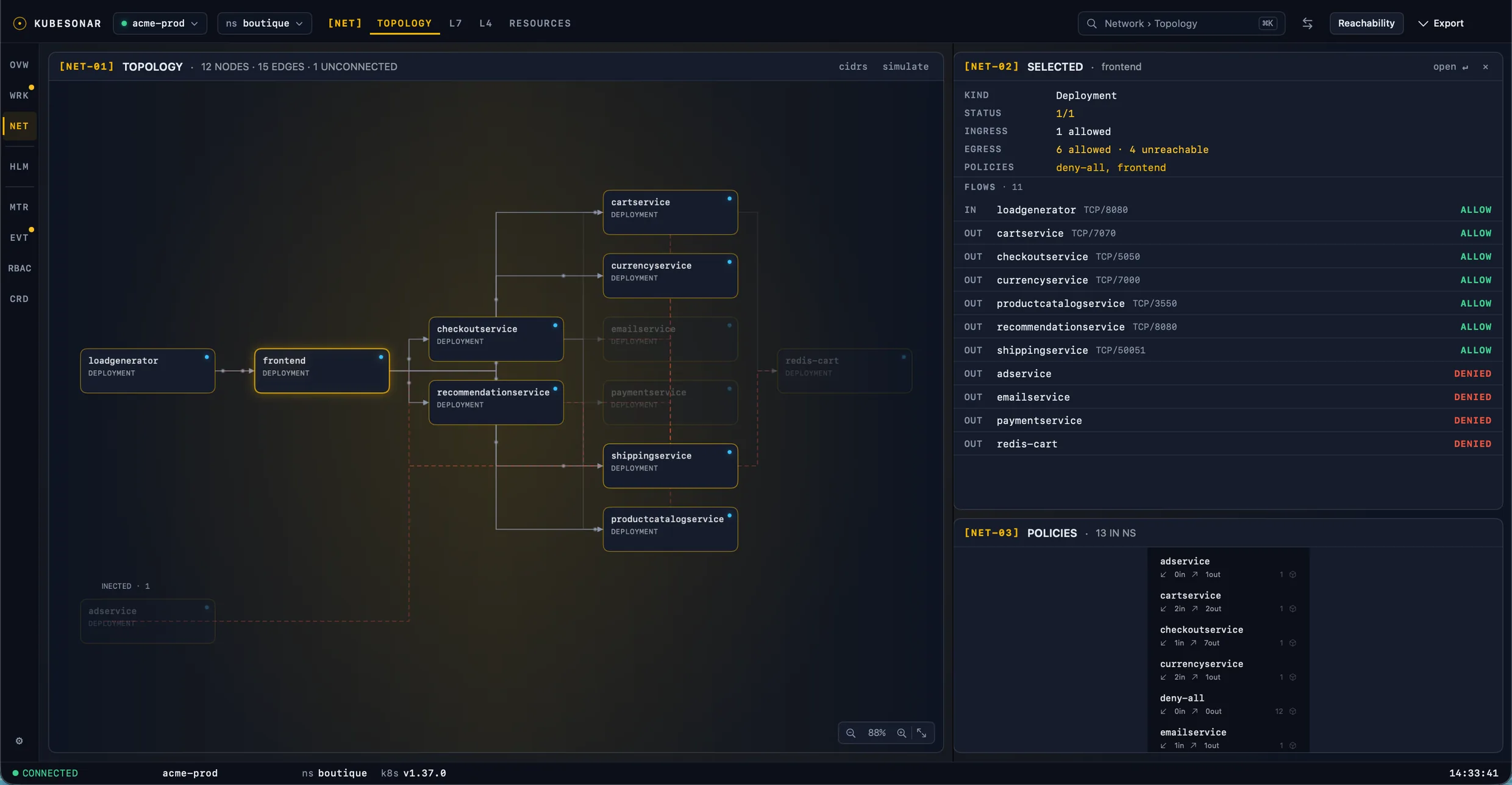
Network policy failures are silent: the pod is healthy, the service exists, and the connection just times out. Kubesonar turns that into a verdict with a reason.
Roll out default-deny with confidence. See which flows a policy will break before it is applied, and which rules select nothing.
From "checkout is failing" to the rule with the typo in three clicks: the red edge, the verdict, the manifest.
Export the topology, observed flows and every policy with its rules as one PDF. Evidence a reviewer can read without cluster access.
Kubesonar evaluates policies the way the CNI does, against the live labels, namespaces and ports in the cluster.
Pick a context and a namespace. Kubesonar reads policies, pods, services and workloads through the API server with a read-only role.
kubectl config current-contextSource, destination, port. The answer names every policy that isolates each side and the rule that allowed or denied the connection.
checkout → payments:50051 · BLOCKEDThe manifest opens on the deciding rule. A selector that matches zero pods is marked as such, with the label it should have matched.
podSelector app=checkout → 0 podsThe same evaluation the app runs, here on the policies of the demo cluster. Pick two workloads and a port. Click a policy to see its rules; the deciding one is highlighted.
Every answer is the policy, the rule index, the port and the protocol, with the reasoning in one sentence.
ipBlock, namespace and pod selectors combined.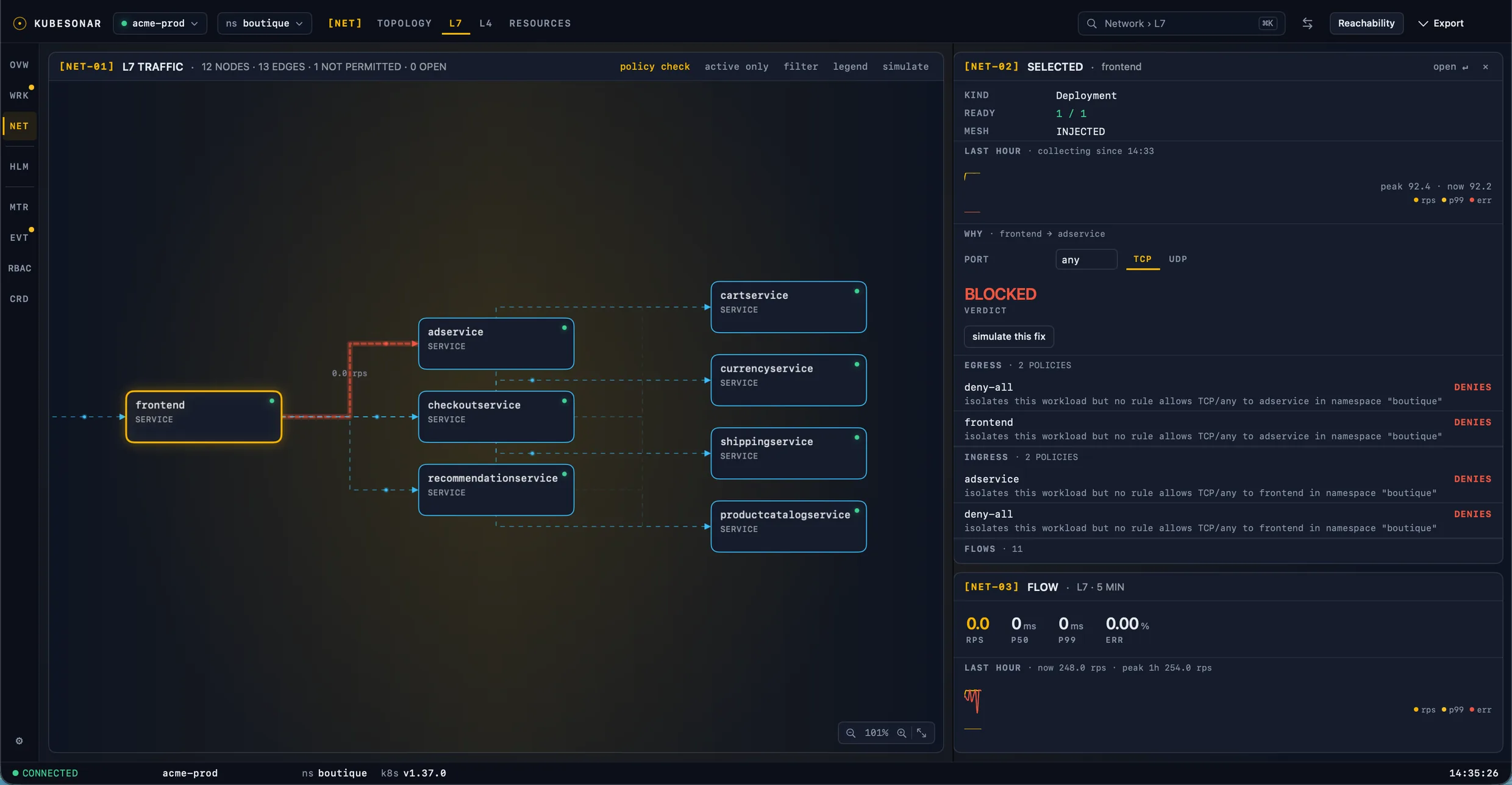
Open a policy from a verdict and it is scrolled to the rule that matched, or should have. Rules that select nothing are called out in place.
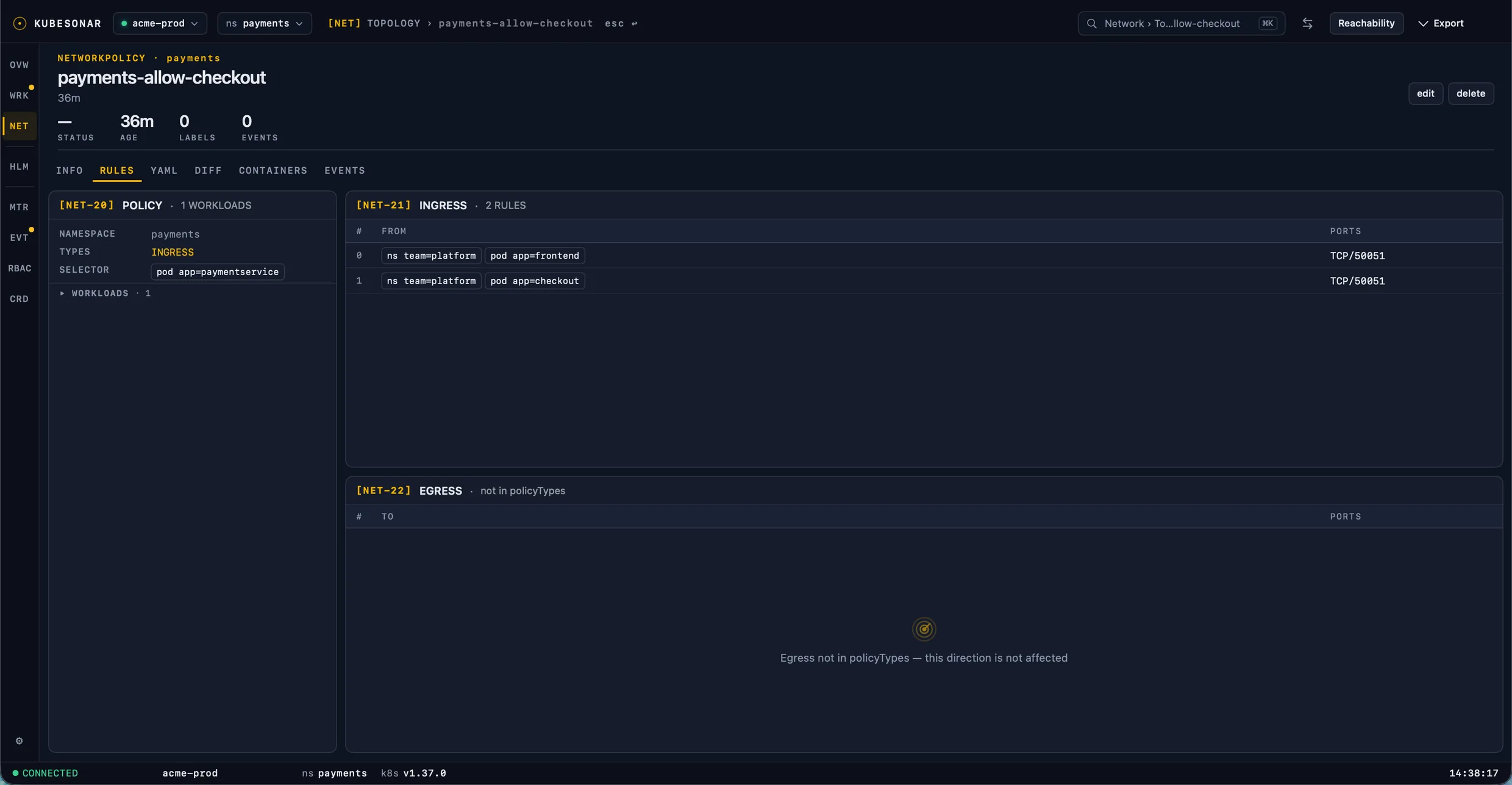
With Istio, Kubesonar reads request rates, latency, errors and TCP connections straight from the Envoy sidecars through the API server. No Prometheus needed. Without a mesh you keep the resolver, the simulator and the topology; there is no observed traffic.
Kubesonar is a full macOS client. The network views are why you will open it; the rest is why you will keep it open.
The cluster at a glance: health score, node load, namespace health, recent warnings and a 60-minute CPU/memory signal.
A desktop app that talks to the API server with the kubeconfig you already have. No agent, no CRD, no webhook. Every network feature works with a read-only role; nothing is written to the cluster unless you ask for it.
codesign --verify --deep --strict.| Resource | Verbs | Used for |
|---|---|---|
| networkpolicies | get list watch | Verdicts, rules and simulation |
| pods, namespaces, nodes | get list watch | Labels, IPs, node placement |
| services, endpointslices | get list watch | Pods behind a service |
| deployments, statefulsets, daemonsets | get list watch | Workload grouping on the graph |
| events | list watch | Event timeline |
| pods/proxy | get | Envoy sidecar metrics: L7 and L4 traffic (Istio). Optional. |
| roles, rolebindings, clusterroles, customresourcedefinitions, Istio resources | get list | RBAC, CRD and Istio views. Optional. |
| pods/log, pods/exec, pods/portforward, apply, scale | per your role | Logs, shell, port-forward and edits. Only on an explicit action. |
Every feature, every update. Try it for 14 days first.
After the trial, these stay free: Overview, workloads (logs, shell, port-forward, scale, restart, delete, YAML apply and edit), Services, Ingress and NetworkPolicies as resources, Helm, usage metrics, events and timeline, RBAC roles, bindings and accounts, CRDs, templates, themes and settings. NetworkPolicy reachability, rules and WHY, the policy simulator, L7/L4 traffic, PNG/PDF export and reports, right-sizing, the RBAC matrix and cluster compare need a license.
No. It is a desktop app that uses your kubeconfig, like kubectl. No agent, no CRD, no webhook.
Kubernetes NetworkPolicy (networking.k8s.io/v1) on any CNI that enforces it. Cilium and Calico policy CRDs show up in the CRD browser but are not evaluated.
Not for the resolver, the simulator or the topology. Observed traffic, L7 requests and L4 connections, comes from Istio's Envoy sidecars; without Istio there is no live traffic view.
Kubesonar keeps working as a free cluster console. Free forever: Overview; workloads with logs, shell/exec, port-forward, scale, restart, delete and YAML apply/edit; Services, Ingress and NetworkPolicies as resources; Helm; usage metrics; events and timeline; RBAC roles, bindings and accounts; CRDs; templates; themes and settings. A license unlocks the network policy tools: the NetworkPolicy topology with reachability, rules and WHY; the policy simulator; L7/L4 traffic with one hour of history; PNG/PDF export and PDF reports; right-sizing; the RBAC matrix; and cluster compare. Activate a license at any time to turn them back on.
Only the license check: key, instance id and hostname. No cluster names, manifests or traffic data.
Yes. Deactivate it in the app and activate the new machine. Each seat allows two.
macOS 15 or later on Apple silicon. The app is signed and notarized by Apple; a universal build is not planned for 1.0.
Kubesonar exists because I spent too many incidents reading NetworkPolicies by hand. It does one thing well: tell you which rule decides a connection, with the evidence. It runs on your Mac, uses your own credentials, and never sends your cluster data anywhere.
Download Kubesonar and resolve your first policy in under a minute.